
Appearance
Report API
Overview
This document describes the Open API endpoints for reporting. All API endpoints require authentication via Bearer token in the Authorization header.
Authentication
All API requests must include a valid authorization token in the request header:
Authorization: Bearer <your_auth_token>You can get your token by navigating to Integration -> SDK & API -> Reporting API on publisher portal. 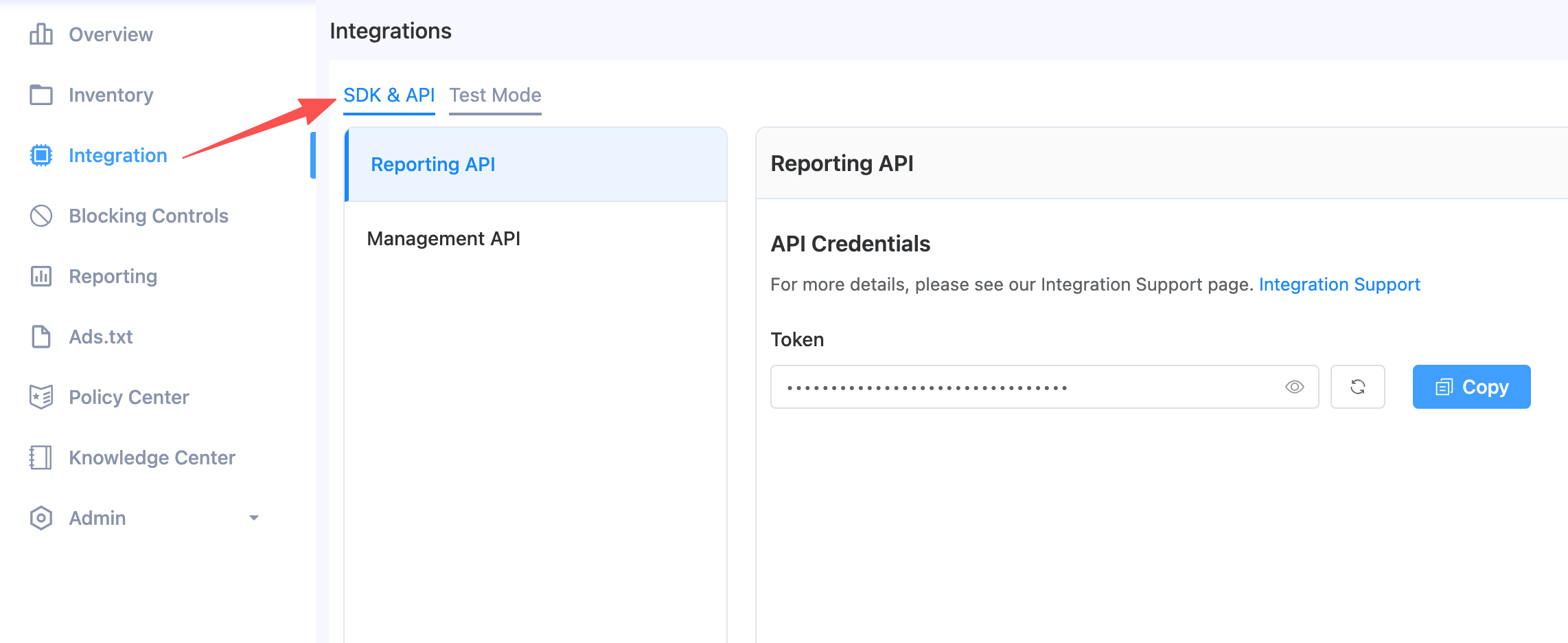
Query Report Data
Retrieves report data with flexible filtering and grouping.
Endpoint: POST https://ofp.adx.opera.com/openapi/report/v1/query
Request Body:
| Field | Type | Required | Description |
|---|---|---|---|
| filters | Filter[] | Yes | Filter conditions (must include day filter) |
| measurements | Measurement[] | Yes | Metrics and dimensions to retrieve |
| offset | int | No | Pagination offset (default: 0) |
| limit | int | Yes | Number of records to return |
Filter Object:
| Field | Type | Description |
|---|---|---|
| name | string | Filter field name (e.g., "day", "app_id", "slot_id") |
| value | any | Filter value (array for date range or ID list) |
Measurement Object:
| Field | Type | Description |
|---|---|---|
| name | string | Metric or dimension name |
| sort | string | Sort direction: "desc", "asc", or "" (no explicit sort). Multiple fields can be sorted, see Sorting and Pagination |
Available Measurements:
This is the complete list of supported measurements. Every measurement below, dimension or metric, can be sorted.
| Name | Type | Description |
|---|---|---|
| day | dimension | Date (YYYYMMDD) |
| publisher_id | dimension | Publisher ID |
| app_id | dimension | App ID |
| slot_id | dimension | Placement ID |
| country_code | dimension | Country code |
| traffic_type | dimension | Traffic type (App/Web) |
| sdk_ad_format | dimension | SDK ad format |
| os_type | dimension | Operating system type |
| costs | metric | Revenue (USD) |
| cost_ecpm | metric | eCPM (USD) |
| requests | metric | Ad requests |
| responses | metric | Ad responses |
| impressions | metric | Ad impressions |
| clicks | metric | Ad clicks |
| ctr | metric | Click-through rate |
| cpc | metric | Cost per click |
| fillrate | metric | Fill rate (responses/requests) |
| showrate | metric | Show rate (impressions/responses) |
Sorting and Pagination
- You can sort by multiple fields at the same time. Set
"sort": "asc"or"sort": "desc"on every measurement you want to sort by. - Sort keys are applied in the order they appear in the
measurementsarray. Put the primary sort key first, then the secondary key, and so on. - Only fields included in
measurementscan be sorted.publisher_name,app_nameandslot_namein the response are display fields. They are not measurements and cannot be sorted. traffic_typeandsdk_ad_formatare returned as readable names, but are sorted by their internal numeric values, not alphabetically by name.- Do not rely on a single sort key that contains duplicate values, e.g. sorting only by
daywhen the query returns several rows per day (one row per app, placement, country, etc.). Specify every sort key you need, in priority order. The recommended approach is to sort by your primary key(s) first, then add every requested dimension as a further sort key (see Example 2 and Example 4). - To page through results, keep
filtersandmeasurements(including everysortvalue) identical across requests, and increaseoffsetbylimituntiloffset >= total.
Example Requests:
1. Query daily summary (metrics only, no dimension breakdown):
day is the only dimension, so each day is returned as exactly one row and sorting by day alone is sufficient.
json
{
  "filters": [{ "name": "day", "value": ["20260106", "20260113"] }],
  "measurements": [
    { "name": "day", "sort": "desc" },
    { "name": "costs", "sort": "" },
    { "name": "requests", "sort": "" },
    { "name": "impressions", "sort": "" },
    { "name": "clicks", "sort": "" },
    { "name": "ctr", "sort": "" },
    { "name": "showrate", "sort": "" }
  ],
  "offset": 0,
  "limit": 50
}
2. Query with breakdown by publisher, app, and placement, sorted by multiple keys:
There are several rows per day (one per placement), so day alone is not enough. Rows are sorted by day desc, then by costs desc within the same day, then by publisher_id, app_id and slot_id ascending so that every row has a fixed position across pages.
json
{
  "filters": [{ "name": "day", "value": ["20260106", "20260113"] }],
  "measurements": [
    { "name": "day", "sort": "desc" },
    { "name": "publisher_id", "sort": "asc" },
    { "name": "app_id", "sort": "asc" },
    { "name": "slot_id", "sort": "asc" },
    { "name": "costs", "sort": "asc" },
    { "name": "requests", "sort": "" },
    { "name": "impressions", "sort": "" },
    { "name": "clicks", "sort": "" },
    { "name": "ctr", "sort": "" },
    { "name": "showrate", "sort": "" }
  ],
  "offset": 0,
  "limit": 50
}
3. Query filtered by specific app, sorted by a metric:
Metrics can be sorted too. Days with the highest revenue come first; days with the same revenue are ordered by day desc.
json
{
  "filters": [
    { "name": "day", "value": ["20260106", "20260113"] },
    { "name": "app_id", "value": ["app13916722328256"] }
  ],
  "measurements": [
    { "name": "day", "sort": "desc" },
    { "name": "costs", "sort": "desc" },
    { "name": "requests", "sort": "" },
    { "name": "impressions", "sort": "" },
    { "name": "clicks", "sort": "" },
    { "name": "ctr", "sort": "" },
    { "name": "showrate", "sort": "" }
  ],
  "offset": 0,
  "limit": 50
}
4. Query filtered by specific placement (with all dimensions and metrics):
A single day can contain many rows (one per country, traffic type, ad format and OS), so every dimension is listed as a sort key after day desc. This gives each row a fixed position, which is the recommended way to page through large results.
json
{
  "filters": [
    { "name": "day", "value": ["20260106", "20260113"] },
    { "name": "slot_id", "value": ["s13916752438656"] }
  ],
  "measurements": [
    { "name": "day", "sort": "desc" },
    { "name": "publisher_id", "sort": "asc" },
    { "name": "app_id", "sort": "asc" },
    { "name": "slot_id", "sort": "asc" },
    { "name": "country_code", "sort": "asc" },
    { "name": "traffic_type", "sort": "asc" },
    { "name": "sdk_ad_format", "sort": "asc" },
    { "name": "os_type", "sort": "asc" },
    { "name": "costs", "sort": "" },
    { "name": "cost_ecpm", "sort": "" },
    { "name": "requests", "sort": "" },
    { "name": "responses", "sort": "" },
    { "name": "impressions", "sort": "" },
    { "name": "clicks", "sort": "" },
    { "name": "ctr", "sort": "" },
    { "name": "cpc", "sort": "" },
    { "name": "fillrate", "sort": "" },
    { "name": "showrate", "sort": "" }
  ],
  "offset": 0,
  "limit": 50
}
Response for Example 1 (daily summary):
json
{
  "message": "ok",
  "rows": [
    {
      "day": "20260112",
      "costs": "0.015609749999999999",
      "requests": "141",
      "impressions": "13",
      "clicks": "1",
      "ctr": "0.07692307692307693",
      "showrate": "0.20967741935483872"
    },
    {
      "day": "20260107",
      "costs": "0",
      "requests": "0",
      "impressions": "0",
      "clicks": "0",
      "ctr": "0",
      "showrate": "0"
    }
  ],
  "statusCode": 0,
  "total": 2
}
Response for Example 2 (with dimension breakdown):
json
{
  "message": "ok",
  "rows": [
    {
      "day": "20260112",
      "publisher_id": "pub13124398458816",
      "publisher_name": "OperaRTB",
      "app_id": "app13336434553408",
      "app_name": "New SDK demo App",
      "slot_id": "s13584962043136",
      "slot_name": "New SDK demo App_Rewarded_Vertical",
      "costs": "0.010806749999999999",
      "requests": "0",
      "impressions": "9",
      "clicks": "1",
      "ctr": "0.1111111111111111",
      "showrate": "9"
    }
  ],
  "statusCode": 0,
  "total": 8
}
Response for Example 4 (all dimensions and metrics):
json
{
  "message": "ok",
  "rows": [
    {
      "day": "20260112",
      "publisher_id": "pub13124398458816",
      "publisher_name": "OperaRTB",
      "app_id": "app13336434553408",
      "app_name": "New SDK demo App",
      "slot_id": "s14353628765376",
      "slot_name": "New SDK demo App_Rewarded Interstitial_Vertical",
      "country_code": "US",
      "traffic_type": "App",
      "sdk_ad_format": "Rewarded Interstitial",
      "os_type": "ANDROID",
      "costs": "0",
      "cost_ecpm": "0",
      "requests": "16",
      "responses": "13",
      "impressions": "0",
      "clicks": "0",
      "ctr": "0",
      "cpc": "0",
      "fillrate": "0.8125",
      "showrate": "0"
    }
  ],
  "statusCode": 0,
  "total": 12
}
Response Fields:
| Field | Description |
|---|---|
| message | Status message |
| rows | Array of report data rows (fields depend on requested measurements) |
| statusCode | Status code (0 = success) |
| total | Total number of matching records |
Error Handling
All API responses follow a consistent format:
Success Response:
json
{
  "code": 0,
  "msg": "ok",
  "data": { ... }
}
Error Response:
json
{
  "code": <error_code>,
  "msg": "<error_message>"
}
Common Error Codes
| Code | Description |
|---|---|
| 400 | Bad Request - Invalid parameters |
| 401 | Unauthorized - Invalid or missing token |
| 403 | Forbidden - Insufficient scope |
| 500 | Internal Server Error |
Rate Limiting
API requests are subject to rate limiting. If you exceed the rate limit, you will receive a 429 Too Many Requests response. Please implement appropriate retry logic with exponential backoff.