
Appearance
Opera Ads SDK Integration Guide for Android
Table of Contents
Overview
Welcome to the integration guide! Opera SDK enables developers to easily integrate high-quality ads into their Android applications, supporting a variety of ad formats. This allows for effective monetization while providing engaging user experiences.
Key Features
- Ad Formats: Native, Banner (MRAID-compliant), Interstitial, Rewarded, Rewarded Interstitial, AppOpen.
- Easy Integration: Minimal setup with Gradle dependencies. Multiple mediation adapters.
- Event Callbacks: Robust listeners for ad lifecycle events (load, show, click, reward, etc.).
- Compliance: Supports GDPR, COPPA and US Privacy.
Set up
Prerequisites
An active account with Opera Ads Publisher Portal to obtain Application ID and ad unit IDs. Please go to Onboarding for help.
Add Dependencies
Add the Ads SDK to your app-level build.gradle file.
repositories {
    maven { url 'https://artifact.op-mobile.opera.com/releases' }
}

dependencies {
    implementation 'com.opera:opera-ads:+'
}
Sync your project to download the dependencies. Use https://artifact.opera.com/releases instead if the main maven host is not available.
Note: It is strongly recommended to integrate via Gradle. If you need to integrate manually, please Contact Support.
Initialization
Initialize the SDK early in your app lifecycle, preferably in Application.onCreate() or Activity.onCreate().
Code Example (Java)
java
import com.opera.ads.AdError;
import com.opera.ads.OperaAds;
import com.opera.ads.initialization.OnSdkInitCompleteListener;
import com.opera.ads.initialization.SdkInitConfig;

public class DemoApplication extends Application {

    @Override
    public void onCreate() {
        super.onCreate();

        OperaAds.initialize(this,
                new SdkInitConfig.Builder("APPLICATION ID") // eg. pub1234567890/ep1234567890/app1234567890
                        .publisherName("PUBLISHER NAME")
                        .build(),
                new OnSdkInitCompleteListener() {
                    @Override
                    public void onSuccess() {
                        // OK.
                    }

                    @Override
                    public void onError(@NonNull AdError error) {
                        // Handle error.
                    }
                });
    }
}- APPLICATION ID: Register on our publisher portal to get your application id.

- Publisher Name: A mobile app developer who integrates ad SDK to display ads and earn revenue. This can also be your application name.
Notice
- Unless otherwise specified, all APIs and callbacks work on the main thread.
- Full support for Kotlin integration begins with version 2.2.2.
- Since v2.4.1, Opera Ads SDK supports initialization from any thread.
Ad Formats
Our SDK supports multiple formats. Each follows a load-show pattern with callbacks.
| Ad Format | Minimum Required Version |
|---|---|
| Native | 2.0.0 |
| Banner | 2.0.0 |
| Interstitial | 2.0.0 |
| Rewarded | 2.0.0 |
| Rewarded Interstitial | 2.7.0 |
| AppOpen | 2.5.0 |
Native Ads
Native ads blend with app content. Load and display in your custom ad container layout.
Code Example (Java)
java
import com.opera.ads.AdError;
import com.opera.ads.nativead.NativeAd;
import com.opera.ads.nativead.NativeAdListener;
import com.opera.ads.nativead.NativeAdLoader;

private NativeAd mNativeAd;

NativeAdLoader.loadAd(context, "YOUR_NATIVE_AD_UNIT_ID", new NativeAdListener() {
    @Override
    public void onAdLoaded(@NonNull NativeAd nativeAd) {
        mNativeAd = nativeAd;
    }

    @Override
    public void onAdFailedToLoad(@NonNull AdError error) {

    }

    @Override
    public void onAdImpression() {

    }

    @Override
    public void onAdClicked() {

    }
});

// Show native ad
// If a certain cached ad is being displayed, please make sure it's still valid (by checking `if (!isAdInvalidated())`)
// at first. Otherwise the ad may fail to show, or impressions may not generate revenue. It can be applied for all formats.
if (!mNativeAd.isAdInvalidated()) {
    // Bind interactive views with ad.
    NativeAd.InteractionViews interactionViews = new NativeAd.InteractionViews.Builder(
        nativeAdMedia  // com.opera.ads.MediaView
    ).setTitleView(nativeAdTitle)
        .setBodyView(nativeAdBody)
        .setCallToActionView(nativeAdCallToAction)
        .setIconView(nativeAdIcon)
        // Bind other views which can be used for interaction.
        .setExtraClickableViews(Arrays.asList(view1, view2))
        .build();
    // The root view is the top level container of the ad layout. FrameLayout is preferred.
    // Each native ad view contains native ad assets, such as the
    // MediaView view element or the Title view element, which must be the descendant view
    // of the root view.
    mNativeAd.registerInteractionViews(rootView, interactionViews);
}

// Destroy ad to release resources.
mNativeAd.destroy();
Tracking video playback
Native ads support video assets since v2.12.0. You can tracking video playback with NativeAd.setVideoPlaybackEventListener(). Also, make sure that the video creative is enabled for the placements on Opera Ads Portal.
java
if (mNativeAd.hasVideoContent()) {
    mNativeAd.setVideoPlaybackEventListener(new VideoPlaybackEventListener() {
        @Override
        public void onVideoStart() {
        }

        @Override
        public void onVideoResume() {
        }

        @Override
        public void onVideoPause() {
        }

        @Override
        public void onVideoEnd() {
        }

        @Override
        public void onVideoMute(boolean isMuted) {
        }
    });
}
Banner Ads (MRAID-compliant)
Banner ads are rectangular ad formats that occupy part of an app’s layout, like standard BANNER (320x50) or BANNER_MREC (300x250), supporting MRAID for rich media interactions. Please see the AdSize class to know all the supported banner sizes.
Banner ads will refresh automatically for BANNER and BANNER_MREC at the default interval, and BannerAdView.setAutoRefreshInterval(int) can be used to set custom intervals. The auto-refresh feature can be enabled/disabled with BannerAdView.setAutoRefreshEnabled(boolean).
You can also configure banner autorefresh interval, or enable/disable auto refresh per ad placement id on Opera Ads console. Please note that API calls take precedence over OFP configuration.
Code Example (Java)
java
import com.opera.ads.AdError;
import com.opera.ads.AdFormat;
import com.opera.ads.AdSize;
import com.opera.ads.banner.BannerAd;
import com.opera.ads.banner.BannerAdListener;
import com.opera.ads.banner.BannerAdView;

private BannerAdView mBannerAdView;

mBannerAdView = new BannerAdView(context);
BannerAdListener adListener = new BannerAdListener() {
    @Override
    public void onAdLoaded(@NonNull BannerAd bannerAd) {
        // Banner is ready.
        // Note that it may be called again on auto refresh.
        // You can check bannerAd.refreshCount to know if it's called for auto refresh.
    }

    @Override
    public void onAdFailedToLoad(@NonNull AdError error) {
        // Banner failed to load.
        // Note that it's only called if it fails to load when loadAd() is called for the first time.
        // Will never be called for auto refresh.
    }

    @Override
    public void onAdImpression() {

    }

    @Override
    public void onAdClicked() {

    }
};
mBannerAdView.setPlacementId("YOUR_BANNER_AD_UNIT_ID");
mBannerAdView.setAdSize(AdSize.BANNER_MREC);
// Load Banner Ad.
// It can be called only once for a BannerAdView.
// If you call loadAd() again then it just fails silently, without any callback.
mBannerAdView.loadAd(adListener);
// Add to layout
bannerContainer.addView(mBannerAdView)

// Destroy ad to release resources
mBannerAdView.destroy();
Interstitial Ads
Full-screen ads shown at natural breaks (e.g. level complete).
Code Example (Java)
java
import com.opera.ads.AdError;
import com.opera.ads.interstitial.InterstitialAd;
import com.opera.ads.interstitial.InterstitialAdInteractionListener;
import com.opera.ads.interstitial.InterstitialAdLoadListener;

private InterstitialAd mInterstitialAd;

// Load Interstitial
InterstitialAd.load(context, "YOUR_INTERSTITIAL_AD_UNIT_ID", new InterstitialAdLoadListener() {
    @Override
    public void onAdLoaded(@NonNull InterstitialAd ad) {
        mInterstitialAd = ad;
    }

    @Override
    public void onAdLoadFailed(@NonNull AdError error) {

    }
});

// Show Interstitial
if (!mInterstitialAd.isAdInvalidated()) {
    mInterstitialAd.show(context, new InterstitialAdInteractionListener() {
        // Called when the ad's fullscreen container was opened.
        @Override
        public void onAdOpened() {

        }

        // Called when the ad's fullscreen content becomes visible to the user.
        // This indicates an impression.
        @Override
        public void onAdDisplayed() {

        }

        @Override
        public void onAdClicked() {

        }

        @Override
        public void onAdDismissed() {

        }

        @Override
        public void onAdFailedToShow(@NonNull AdError error) {

        }
    });
}

// Destroy ad to release resources
mInterstitialAd.destroy();
Rewarded
Users watch for rewards. Callback on completion.
Code Example (Java)
java
import com.opera.ads.AdError;
import com.opera.ads.RewardItem;
import com.opera.ads.RewardSsvOptions;
import com.opera.ads.rewarded.RewardedAd;
import com.opera.ads.rewarded.RewardedAdInteractionListener;
import com.opera.ads.rewarded.RewardedAdLoadListener;

private RewardedAd mRewardedAd;

// Load Rewarded
RewardedAd.load(context, "YOUR_REWARDED_AD_UNIT_ID", new RewardedAdLoadListener() {
    @Override
    public void onAdLoaded(@NonNull RewardedAd ad) {
        mRewardedAd = ad;
    }

    @Override
    public void onAdLoadFailed(@NonNull AdError error) {

    }
});

// Show Rewarded
if (!mRewardedAd.isAdInvalidated()) {
    mRewardedAd.setSceneId("Demo scene #1");
    mRewardedAd.setRewardSsvOptions(new RewardSsvOptions.Builder()
            // user id: max length 100 bytes after url encoded, or will be discarded.
            .userId("Demo user id")
            // custom data: max length 1KB after url encoded, or will be discarded.
            .customData("Demo user custom data")
            .build());
    mRewardedAd.show(context, new RewardedAdInteractionListener() {
        // Called when the ad's fullscreen container was opened.
        @Override
        public void onAdOpened() {

        }

        // Called when the ad's fullscreen content becomes visible to the user.
        // This indicates an impression.
        @Override
        public void onAdDisplayed() {

        }

        @Override
        public void onAdClicked() {

        }

        @Override
        public void onAdDismissed() {

        }

        @Override
        public void onAdFailedToShow(@NonNull AdError error) {

        }

        @Override
        public void onRewarded(@NonNull RewardItem reward) {

        }
    });
}

// Destroy ad to release resources
mRewardedAd.destroy();
Rewarded Interstitial
Full-screen video that rewards the user for watching, but user can close it before the video finished.
Code Example (Java)
java
import com.opera.ads.AdError;
import com.opera.ads.AdFormat;
import com.opera.ads.RewardItem;
import com.opera.ads.RewardSsvOptions;
import com.opera.ads.rewardedinterstitial.RewardedInterstitialAd;
import com.opera.ads.rewardedinterstitial.RewardedInterstitialAdInteractionListener;
import com.opera.ads.rewardedinterstitial.RewardedInterstitialAdLoadListener;

private RewardedInterstitialAd mRewardedInterstitialAd;

// Load Rewarded Interstitial ad
RewardedInterstitialAd.load(context, "YOUR_REWARDED_INTERSTITIAL_AD_UNIT_ID", new RewardedInterstitialAdLoadListener() {
    @Override
    public void onAdLoaded(@NonNull RewardedInterstitialAd ad) {
        mRewardedInterstitialAd = ad;
    }

    @Override
    public void onAdFailedToLoad(@NonNull AdError error) {

    }
});

// Show Rewarded Interstitial ad
if (!mRewardedInterstitialAd.isAdInvalidated()) {
    mRewardedInterstitialAd.setSceneId("Demo scene");
    mRewardedInterstitialAd.setRewardSsvOptions(new RewardSsvOptions.Builder()
            // user id: max length 100 bytes after url encoded, or will be discarded.
            .userId("Demo user id")
            // custom data: max length 1KB after url encoded, or will be discarded.
            .customData("Demo user custom data")
            .build());
    mRewardedInterstitialAd.show(context, new RewardedInterstitialAdInteractionListener() {
        // Called when the ad's fullscreen container was opened.
        @Override
        public void onAdOpened() {

        }

        // Called when the ad's fullscreen content becomes visible to the user.
        // This indicates an impression.
        @Override
        public void onAdDisplayed() {

        }

        public void onAdClicked() {

        }

        @Override
        public void onAdDismissed() {

        }

        @Override
        public void onAdFailedToShow(@NonNull AdError error) {

        }

        @Override
        public void onUserRewarded(@NonNull RewardItem reward) {

        }
    });
}

// Destroy ad to release resources
mRewardedInterstitialAd.destroy();
AppOpen
To monetize your app load screens. AppOpen ads can be shown when users bring app to the foreground.
Code Example (Java)
java
import com.opera.ads.AdError;
import com.opera.ads.AdFormat;
import com.opera.ads.appopen.AppOpenAd;
import com.opera.ads.appopen.AppOpenAdInteractionListener;
import com.opera.ads.appopen.AppOpenAdLoadListener;

private AppOpenAd mAppOpenAd;

// Load AppOpen ad
AppOpenAd.load(context, "YOUR_APPOPEN_AD_UNIT_ID", new AppOpenAdLoadListener() {
    @Override
    public void onAdLoaded(@NonNull AppOpenAd ad) {
        mAppOpenAd = ad;
    }

    @Override
    public void onAdFailedToLoad(@NonNull AdError error) {

    }
});

// Show AppOpen ad
if (!mAppOpenAd.isAdInvalidated()) {
    mAppOpenAd.show(context, new AppOpenAdInteractionListener() {
        // Called when the ad's fullscreen container was opened.
        @Override
        public void onAdOpened() {

        }

        // Called when the ad's fullscreen content becomes visible to the user.
        // This indicates an impression.
        @Override
        public void onAdDisplayed() {

        }

        public void onAdClicked() {

        }

        @Override
        public void onAdDismissed() {

        }

        @Override
        public void onAdFailedToShow(@NonNull AdError error) {

        }
    });
}

// Destroy ad to release resources
mAppOpenAd.destroy();
Obfuscation & Resources
Proguard
We have wrapped the consumer proguard files in the AAR artifact. No additional rules are needed.
Shrink Resources
If you use any shrinking tools, please add our resource file, where the resource IDs start with opera_ads_ to your whitelist in keep.xml.
<resources xmlns:tools="http://schemas.android.com/tools"
    tools:keep="@drawable/opera_ads_*,
    @dimen/opera_ads_*"/>
Hardware Acceleration
For a better viewing experience, we recommend enabling hardware acceleration.
Hardware acceleration is enabled by default, but some apps may choose to disable it. If this applies to your app, we recommend enabling hardware acceleration for Activity classes that use ads.
Demo Example IDs
For a complete working example, check out our official demo app on GitHub: Opera Ads Android SDK Demo
Package Name: com.opera.ads.demo
APPLICATION ID: pub13423013211200/ep13423013211584/app13423536670400
| Ad Format | Ad Unit ID |
|---|---|
| Native | s13429368154496 |
| Banner | s13429297184768 |
| Interstitial | s13424442482432 |
| Rewarded | s13938889680960 |
| Rewarded Interstitial | s14352672069184 |
| AppOpen | s14352673721856 |
Privacy
GDPR
Opera Ads is listed in TCF Global Vendor List, id: 1135, please make sure to enable Opera Ads in your CMP provider's backend (e.g. Google UMP). Opera Ads SDK will read application's consent status from system preference, and send to Ad Networks in ad requests.

COPPA
Generally speaking, the Children’s Online Privacy Protection Act (COPPA) regulates the collection, use, and disclosure of personal information for children under the age of 13 by certain websites and online services (including mobile apps). For more information on COPPA, please refer to the Federal Trade Commission's COPPA FAQ. Use PrivacyManager.setCoppa(...) to change COPPA status.
java
/**
 * Flag indicating if it's subject to the COPPA: 0 = no, 1 = yes, null = unspecified.
 *
 * See [COPPA](https://www.ftc.gov/business-guidance/privacy-security/childrens-privacy).
 */
PrivacyManager.setCoppa(...)
CCPA (U.S. states privacy)
To help you comply with U.S. states privacy laws, use PrivacyManager.setUSPrivacy(...) to change or apply the compliance status of CCPA. For more information, please refer to IAB USPrivacy.
java
/**
 * The consumer privacy under US privacy regulation.
 *
 * See [The IAB Tech Lab's US Privacy String](https://github.com/InteractiveAdvertisingBureau/USPrivacy).
 */
PrivacyManager.setUSPrivacy(...)
Privacy & Data Collection
ADN Information
| ADN Full Name | Opera Ads Network |
| ADN Terms of Service Link | https://accounts.adx.opera.com/terms/service |
| ADN Privacy Policy Link | https://www.opera.com/legal/privacy |
ADN Data Collection List
| Data Field | Description |
|---|---|
| Google Advertising ID | Also known as GAID; the core identifier for ad targeting. |
| UID | A 64-character lowercase hex string generated and persisted by the SDK. |
| Longitude | The device's last known geographic coordinates, rounded to 1 decimal place (4–10 km precision). |
| Latitude | The device's last known geographic coordinates, rounded to 1 decimal place (4–10 km precision). |
| Country Code | A three-letter ISO 3166-1 alpha-3 country code. |
| IPv4/IPv6 | Deprecated. |
| Operator (Carrier) | The carrier name from the SIM card or currently registered network. |
| MCC-MNC | Mobile Country Code and Mobile Network Code. |
| Screen Info | Real screen width/height in pixels, PPI (pixels per inch), and pixel density ratio. |
| OS & OS version | The operating system name (e.g., "Android") and version number (e.g., "14" / API level 34). |
| Model & Manufacturer | Device manufacturer (e.g., "Samsung"), model (Build.MODEL, e.g., "SM-G991B"), and codename. |
| Language | The device's system language in ISO 639-1 alpha-2 format (e.g., "en", "zh"). |
| Battery | Device battery level percentage and charging status (USB / AC / wireless). |
| Volume State | Media volume percentage and whether the device is in silent/vibrate mode. |
| System Boot Time | The UTC timestamp (milliseconds) of when the device last booted. |
| ROM Fingerprint | Build.FINGERPRINT — a string that uniquely identifies the device's Android build/ROM. |
Note: GDPR, COPPA, and CCPA consent fields are already described in the sections above.
Advanced
Audio Control for Video Ads
Opera Ads SDK provides fine-grained control over audio playback for ads with video content through the OperaAds.setMuted() API. The video ads playback is muted by default.
API Usage
java
/**
 * Control audio playback state for video ads.
 *
 * @param muted Audio control setting.
 */
OperaAds.setMuted(@Nullable Boolean muted);
Parameter Values
| Value | Behavior | Use Case |
|---|---|---|
true | Force mute all video ads | Apps that prefer silent ads, or during quiet hours |
false | Force unmute all video ads | Apps with audio-focused content, after user permission |
null | Default behavior (mute autoplay) | Let the system decide based on autoplay policies |
Important Notes
- Must be called before loading ads: The muted setting only affects ads loaded after calling
setMuted(). It does not apply to already-loaded ads. - Global setting: The setting applies to all video ad formats across the entire SDK.
- Persistence: The setting persists for the current app session until changed again.
Code Example
java
// Example 1: Mute all video ads
OperaAds.setMuted(true);
// Now load ads - they will play muted
RewardedAd.load(context, placementId, loadListener);

// Example 2: Unmute all video ads
OperaAds.setMuted(false);
// Load new ads - they will play with sound
InterstitialAd.load(context, placementId, loadListener);

// Example 3: Let the system decide based on autoplay policies
OperaAds.setMuted(null);
// Load ads - system decides audio behavior
BannerAdView bannerAdView = new BannerAdView(context);
bannerAdView.setPlacementId(placementId);
bannerAdView.loadAd(adListener);
Server-Side Verification (SSV) for Rewarded Ads
Opera Ads SDK supports Server-Side Verification callbacks for Rewarded and Rewarded Interstitial ads, allowing you to verify reward delivery on your own server before granting rewards to users. This feature is available starting from version 2.4.0.
Configuration on Opera Publisher Portal
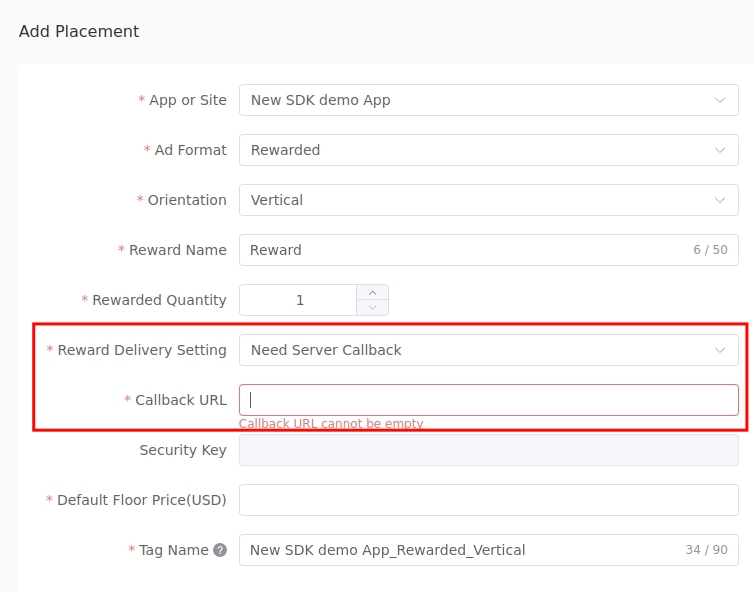
To enable server-side verification for your rewarded ad placements:
- Log in to the Opera Ads Publisher Portal
- Navigate to your app's placement settings
- When creating or editing a Rewarded or Rewarded Interstitial ad placement:
- Set Reward Delivery Setting to "Need Server Callback"
- Enter your Callback URL where you want to receive reward verification notifications
Integration with Mediation Platforms
If you integrate Opera Ads SDK through mediation platforms (e.g. AdMob), you can use the mediation platform's own SSV callback mechanism instead of Opera's direct SSV. Please refer to your mediation platform's documentation for SSV setup:
- AdMob: Google AdMob SSV Documentation
- AppLovin MAX: Configure SSV in AppLovin dashboard
- TopOn: Configure SSV in TopOn dashboard
For direct integration (non-mediation), use Opera Publisher Portal's SSV configuration as described above.
Advanced Integration Options
Opera Ads SDK supports advanced integration modes for optimal monetization:
Client Bidding (C2S)
Client Bidding allows you to run ad auctions on the client side, giving you full control over the bidding process and auction results. This enables you to compare Opera ads with other ad networks in real-time and show the highest-paying ad.
For complete integration guide, see Client Bidding Documentation.
Server Bidding (S2S)
Server Bidding provides APIs for server-side auction scenarios, allowing you to build your own mediation server or integrate with third-party mediation solutions that support server-to-server bidding.
For complete integration guide, see Server Bidding Documentation.
Testing
Use test ad unit IDs from our dashboard. Alternatively, you can add your devices to the Test Device List for loading test ads.
FAQ
Q: My app's minSdk is lower than 24, how can I integrate Opera Ads SDK?
A: Opera Ads SDK requires minSdk 24 (Android 7.0). If your app targets a lower API level, you need to override the library's minSdk requirement in your AndroidManifest.xml:
xml
<manifest xmlns:android="http://schemas.android.com/apk/res/android"
    xmlns:tools="http://schemas.android.com/tools"
    package="com.yourapp.package">

    <uses-sdk tools:overrideLibrary="com.opera.ads" />

    <!-- Your other manifest entries -->
</manifest>
SDK Behavior on Unsupported Devices:
Opera Ads SDK automatically detects the device API level during initialization:
- On devices with API level >= 24: Initialization succeeds normally.
- On devices with API level < 24: Initialization fails immediately and triggers
OnSdkInitCompleteListener.onError()with an appropriate error message. The app is still running normally, but it cannot successfully load Opera Ads SDK.
Important: Using tools:overrideLibrary only allows compilation - it does not make the SDK compatible with API levels below 24.
Q: Why do I encounter OkHttp3 related errors during compilation or runtime after integrating Opera Ads SDK?
A: Opera Ads SDK depends on OkHttp 4.x as default. We strongly recommend using the latest version of OkHttp. But if you have to use version 3.x, you can implement Opera Ads SDK OkHttp 3.x compatible version:
dependencies {
    implementation 'com.opera:opera-ads-okhttp3:+'
}
Best Practices
- Load Ads Early: Preload ads in background for faster display (similar to AdMob).
- User Consent: Always collect and pass consent (GDPR/CCPA) before initializing.
- Error Handling: Implement retries for ad load failures.
- Frequency Capping: Limit interstitials/rewarded to avoid user churn (e.g., 1 per 5 minutes).
- High-Engagement Ads: Use for premium placements to boost eCPM.
Troubleshooting
- Ads Not Loading: Check internet, permissions, API key, and console logs.
- Initialization Failed: Verify SDK version and manifest entries.
- Contact Support: Reach out via Contact Support with logs.