
Appearance
TopOn Mediation Integration
IMPORTANT
Opera Ads is an officially supported bidding ad network named "Opera" on TopOn. We highly recommend integrating the Opera Ads SDK by following the TopOn Mediation Network Guide.
Alternatively, you can integrate the Opera Ads SDK as a custom ad network by following instructions below.
Supported Ad Formats
| TopOn Ad Format | Minimum required version of Opera adapter |
|---|---|
| Native | 2.0.0.0 |
| Banner | 2.0.0.0 |
| Interstitial | 2.0.0.0 |
| Rewarded | 2.0.0.0 |
| Splash | 2.5.0.0 |
Configure Custom Ad Network in TopOn Console
Refer to Custom Network on TopOn Mediation Network Guide for detailed information.
Add Custom Ad Network
- Sign in to the TopOn Console
- Navigate to Mediation → Network → Custom Network
- Click Add Custom Network
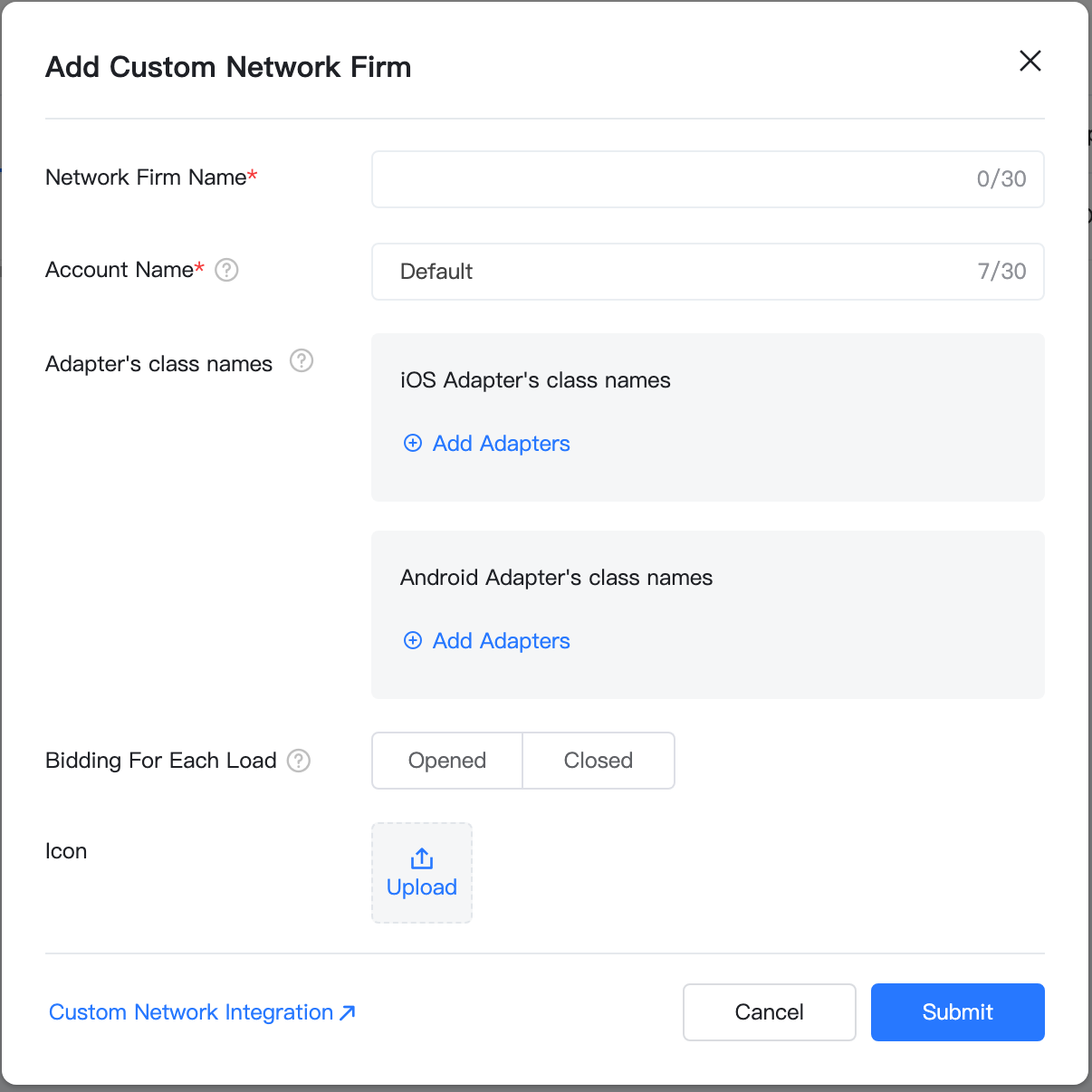
Configure Adapter Class Names for Different Ad Formats
TopOn requires separate adapter classes for each ad format:
| Ad Format | Adapter Class Name (Android) |
|---|---|
| Native | com.opera.ads.mediation.topon.OperaNativeAdapter |
| Banner | com.opera.ads.mediation.topon.OperaBannerAdapter |
| Interstitial | com.opera.ads.mediation.topon.OperaInterstitialAdapter |
| Rewarded | com.opera.ads.mediation.topon.OperaRewardAdapter |
| Splash | com.opera.ads.mediation.topon.OperaSplashAdapter |
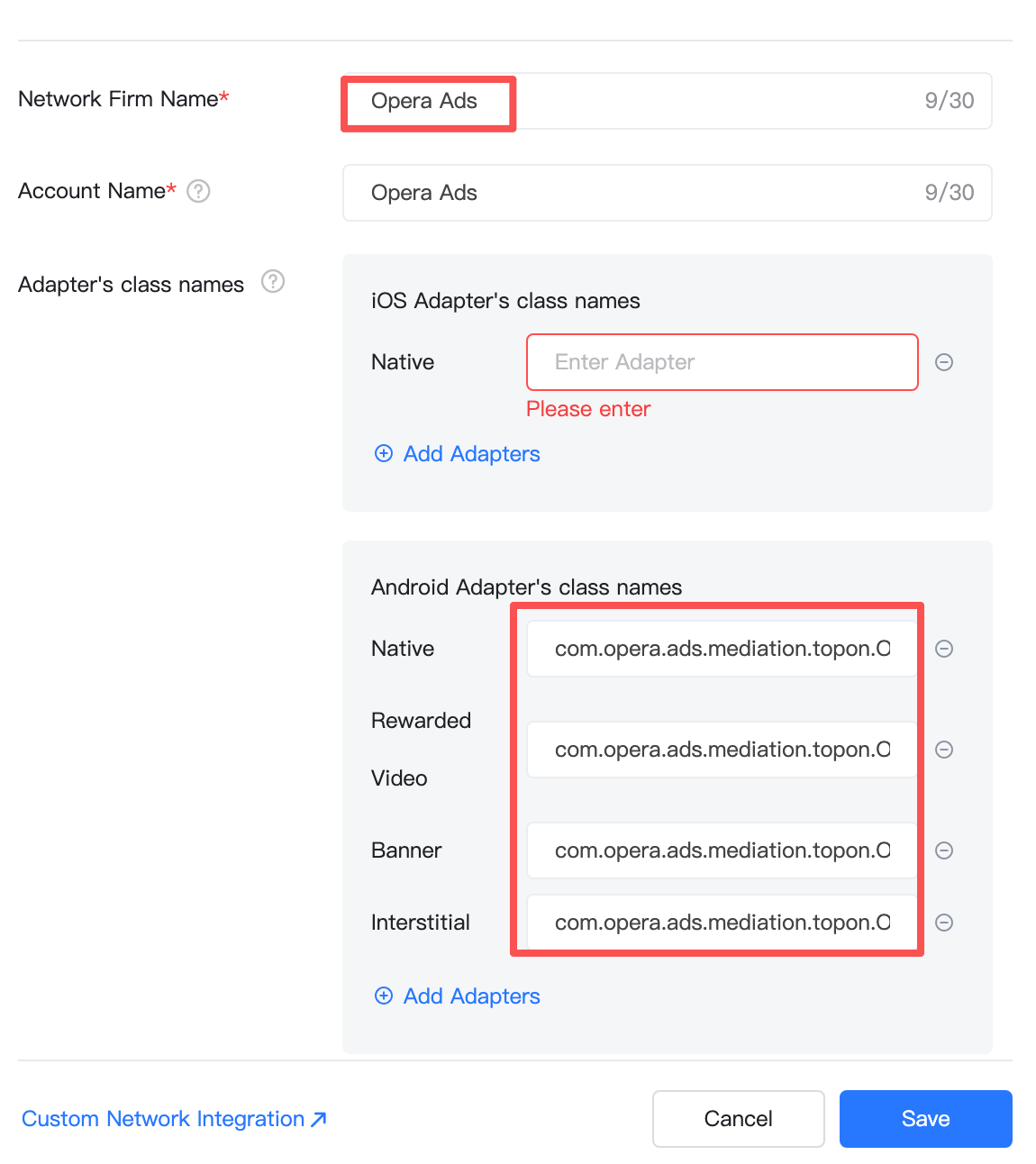
Banner
After the Ad Network is added, click Ad Source Settings. Select banner format ad units, click Add Ad Source. Please set the correct size for corresponding Opera Banner AdSize when you add an "Ad Source" for the ad unit of Banner on TopOn console. The "size" of AdSize.BANNER should be "320x50" in DP, and for AdSize.BANNER_MREC it should be "300x250" in DP.
Also, please also make sure Bottom Ads is enabled, for Opera Ads network to be the backfill ad network for unbidded requests. 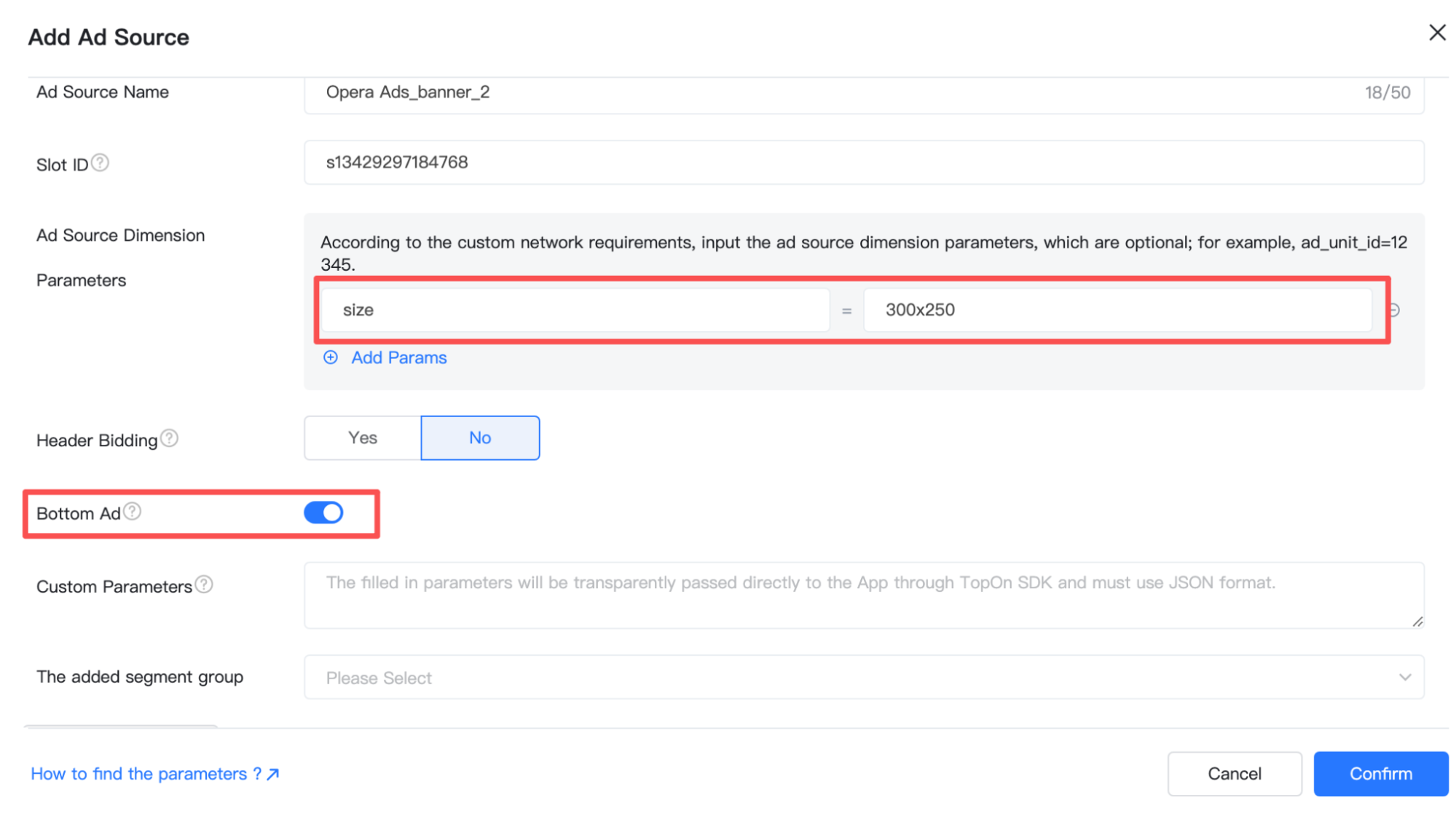
Add Dependencies
Add Opera Ads SDK maven repository:
kotlin
repositories {
    maven {
        url = uri("https://artifact.op-mobile.opera.com/releases")
    }
}

// For the versions of TopOn SDK before **6.5.12**, add the following dependencies to your app's `build.gradle` or `build.gradle.kts` file:
dependencies {
    // Opera Ads custom adapter for TopOn < 6.5.12
    implementation("com.opera:opera-ads-topon-anythink-adapter:+")

    // TopOn SDK (Anythink package name - for SDK < 6.5.12)
    val tpnSdk = "6.5.11"
    implementation("com.anythink.sdk:core-tpn:$tpnSdk")
    implementation("com.anythink.sdk:banner-tpn:$tpnSdk")
    implementation("com.anythink.sdk:interstitial-tpn:$tpnSdk")
    implementation("com.anythink.sdk:rewardedvideo-tpn:$tpnSdk")
    implementation("com.anythink.sdk:nativead-tpn:$tpnSdk")
    implementation("com.anythink.sdk:splash-tpn:$tpnSdk")
}

// Since Opera Ads SDK v2.4.0, we support TopOn SDK >= 6.5.12, add the dependencies as follows:
dependencies {
    // Opera Ads TopOn Adapter for package name "com.secmtp.sdk"
    implementation("com.opera:opera-ads-topon-secmtp-adapter:+")

    // TopOn SDK (Anythink package name - for SDK in [6.5.12, 6.5.40])
    val tpnSdk = "6.5.12"
    implementation("com.anythink.sdk:core-tpn:$tpnSdk")
    implementation("com.anythink.sdk:banner-tpn:$tpnSdk")
    implementation("com.anythink.sdk:interstitial-tpn:$tpnSdk")
    implementation("com.anythink.sdk:rewardedvideo-tpn:$tpnSdk")
    implementation("com.anythink.sdk:nativead-tpn:$tpnSdk")
    implementation("com.anythink.sdk:splash-tpn:$tpnSdk")
}

// For the versions of TopOn SDK after **6.5.40**, add the dependencies as follows:
dependencies {
    // Opera Ads TopOn Adapter for package name "com.secmtp.sdk" is released since "2.10.0.0".
    implementation("com.opera:opera-ads-topon-secmtp-adapter:+")

    // TopOn SDK (Anythink package name - for SDK > 6.5.40)
    implementation("com.anythink.sdk:core-tpn:6.5.41")
}
Additional Code Optional
Native Ad
We supports setting the position of Ad Choice with TopOn extra property ATAdConst.KEY.AD_CHOICES_PLACEMENT.
java
Map<String, Object> localExtra = new HashMap<>();
// Specify the position of the 'i' icon
localExtra.put(ATAdConst.KEY.AD_CHOICES_PLACEMENT, ATAdConst.AD_CHOICES_PLACEMENT_TOP_LEFT);
mATNative.setLocalExtra(localExtra);
Privacy Compliance
GDPR
Please refer to GDPR, Opera Ads SDK reads application's consent string automatically.
COPPA
Please refer to COPPA. You can use the API PrivacyManager.setCoppa(...) to set coppa status.
CCPA (U.S. states privacy)
Please refer to U.S. states privacy setup. You can use the API PrivacyManager.setUSPrivacy(...) to set the compliance status of CCPA.