
Appearance
AppLovin MAX Mediation Integration
Supported Ad Formats
| AppLovin Ad Format | Minimum required version of Opera adapter |
|---|---|
| Native | 2.0.0.0 |
| Banner | 2.0.0.0 |
| MREC | 2.0.0.0 |
| Interstitial | 2.0.0.0 |
| Rewarded | 2.0.0.0 |
Configure Custom Network in AppLovin Console
Please refer to Integrating custom SDK networks on Max Mediated network guides for detailed information.
Add Custom SDK Network
- Sign in to the AppLovin MAX Dashboard
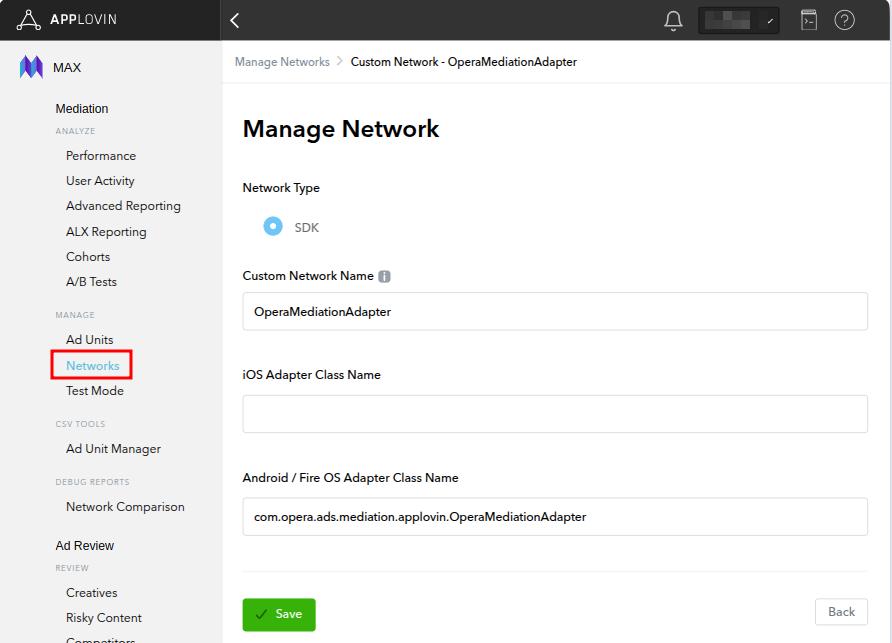
- Navigate to MAX → Mediation → Manage → Networks
- Click Click here to add a Custom Network at the bottom of the page.
- Fill in the following information:
- Network Type: SDK
- Network Name: OperaMediationAdapter
- Android / Fire OS Adapter Class Name:
com.opera.ads.mediation.applovin.OperaMediationAdapter
Configure Ad Units
On the Ad Units page, add Opera Ads as an ad source for each ad unit:
- Select an ad unit → Custom Networks → Find OperaMediationAdapter
- Click Enable to activate it
- Configure Custom Parameters
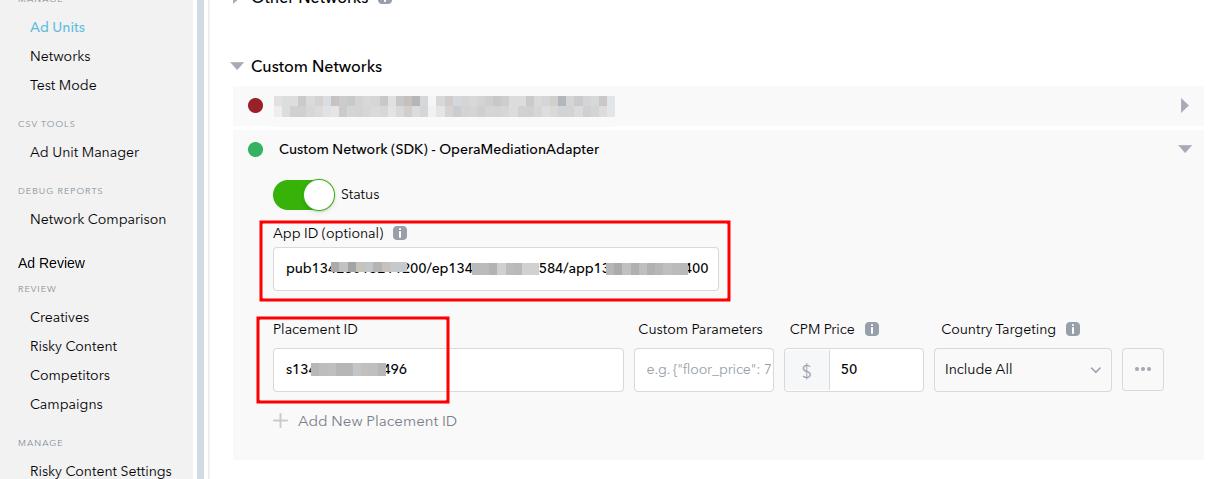
Parameter Description:
App ID: Your Application ID from Opera publisher portal (required), e.g. "pub1234567890/ep1234567890/app1234567890".Placement ID: Placement id from Opera Ads, e.g. "s1234567890".
Add Dependencies
Add Opera Ads SDK maven repository:
kotlin
repositories {
    maven {
        url = uri("https://artifact.op-mobile.opera.com/releases")
    }
}

// Add the following dependencies to your app's `build.gradle` or `build.gradle.kts` file:
dependencies {
    // Opera Ads AppLovin Adapter
    implementation("com.opera:opera-ads-applovin-adapter:+")

    // AppLovin MAX SDK
    implementation("com.applovin:applovin-sdk:13.5.0")
}
Additional Code Required
No additional code is required for integration.
Privacy Compliance
GDPR
Please refer to GDPR, Opera Ads SDK reads application's consent string automatically.
COPPA
Please refer to COPPA. You can use the API PrivacyManager.setCoppa(...) to set coppa status.
CCPA (U.S. states privacy)
OperaMediationAdapter automatically updates the CCPA status from AppLovin mediation configuration when requesting ads. Please refer to U.S. states privacy setup for more information.
FAQ
Q: Why doesn't Opera Ads initialize?
A: AppLovin supports Selective init. Please ensure that the ad unit you specified has Opera Ads enabled for it.